How to fix common OCR errors in receipts
A checklist for catching wrong dates, missing tax lines, vendor-name mixups, and total mismatches.
4 min read · Updated
In short
Check the date first, then whether the subtotal, tax and total add up, then the vendor name. ExpenSheet flags inconsistent rows and runs the check again after you correct a cell; keep a manual review step for high-value receipts.
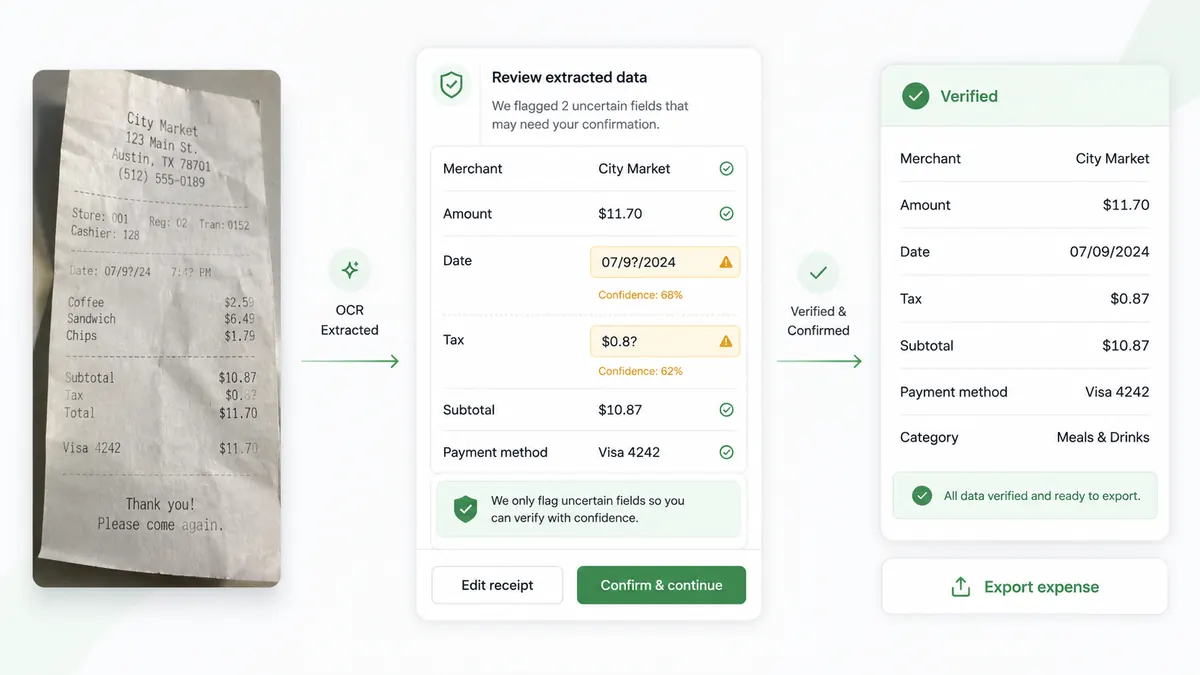
OCR accuracy depends on the quality of the document. Wrinkled paper, glare, low contrast, handwritten notes, and tilted photos can all create mistakes. The goal is not perfection on every scan; it is a reliable review process.
Start with dates. OCR may confuse the transaction time with the date or misread short date formats. Standardize dates before sorting or reporting.
Then review money fields. Total, tax amount, and subtotal should make sense together. A missing decimal point or extra digit can change an expense dramatically. If a receipt has multiple tax lines, verify that the total tax field is the one you use for reporting. ExpenSheet runs this check on the table automatically and flags inconsistent rows; when you correct a cell by hand the net, tax, and total check runs again, so you can see immediately whether your corrected value agrees with the rest.
Vendor names are another common issue. Card brands, payment processors, or bank names may be detected as the vendor. Correcting vendor names makes later analysis more useful. To compare a suspicious row against the original, double-click it; if one photo held several receipts, you get the cropped image of just that receipt.
To improve future scans, photograph receipts on a flat surface with even lighting and include the full page. For PDFs, prefer text-based files when available because they usually produce cleaner extraction.
For high-value receipts, always keep a manual review step. Automation saves time, but a reviewed spreadsheet is what makes the archive dependable.