How to read VAT and sales tax on receipts
UK VAT, US sales tax, and common receipt tax fields explained for spreadsheet review.
4 min read · Updated
In short
On UK receipts look for the VAT rate, VAT amount, net amount and gross total; on US receipts look for a sales tax line added to the subtotal. Store the tax amount and the total separately, leave the tax blank rather than guessing, and watch the decimal separators.
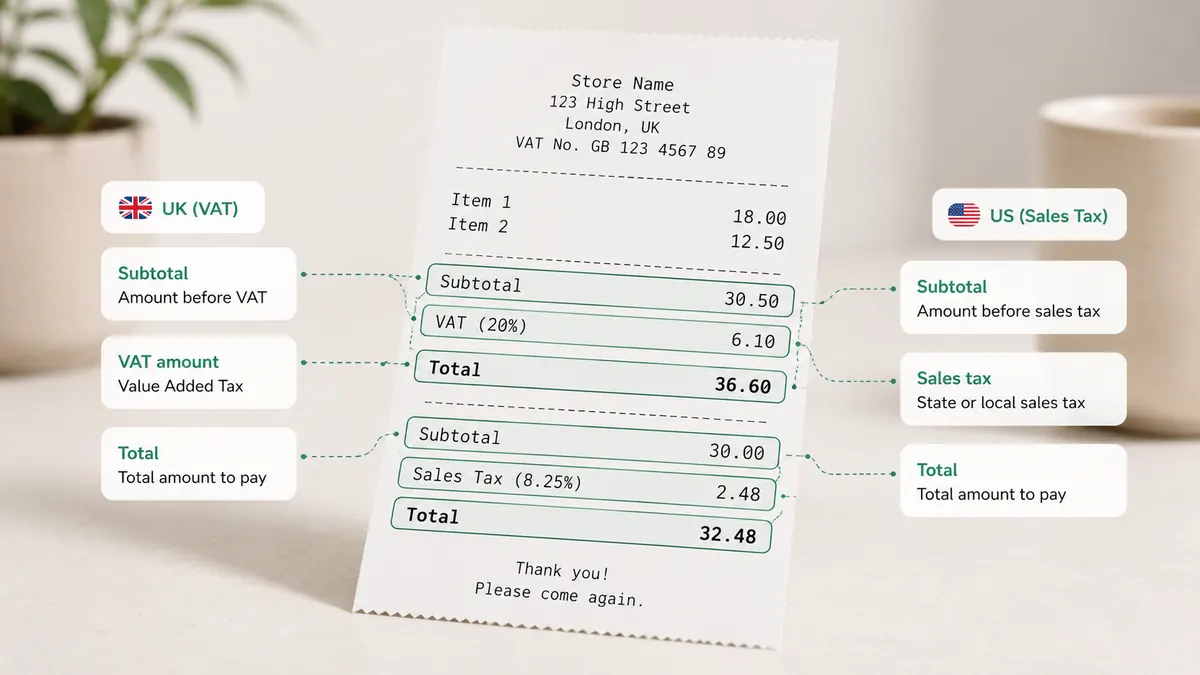
Tax fields on receipts vary by country. In the UK, receipts often show VAT rate, VAT amount, net amount, and gross total. In the United States, many receipts show sales tax rather than VAT, and the rate depends on the state, city, and product category.
For UK receipts, check whether the vendor is VAT-registered and whether the receipt is detailed enough for your accounting needs. The key numbers are the VAT amount and the total including VAT. Some receipts show multiple VAT rates when goods and services are mixed.
For US receipts, look for "sales tax", "tax", or a local tax line near the total. Sales tax is usually added at checkout, so the subtotal plus tax should equal the final total. If the business operates across states, keep the location as part of the record.
OCR errors often happen around decimal separators and currency symbols. A total of 19.90 can be read as 1990, or a small tax value can be missed entirely on low-quality images. Always compare tax and total fields when the value matters.
For spreadsheet review, store both the tax amount and the total amount. If the document has no tax line, mark it as blank rather than guessing. A blank field is easier to review than a fabricated number.
When a receipt mixes several rates, ExpenSheet shows the document as one row per rate when the printed breakdown allows it, and flags a row whose VAT fits no single rate so you can split it before exporting.
Tax rules change and exceptions are common. Use the receipt data as an organized record, then confirm reporting treatment with a professional.